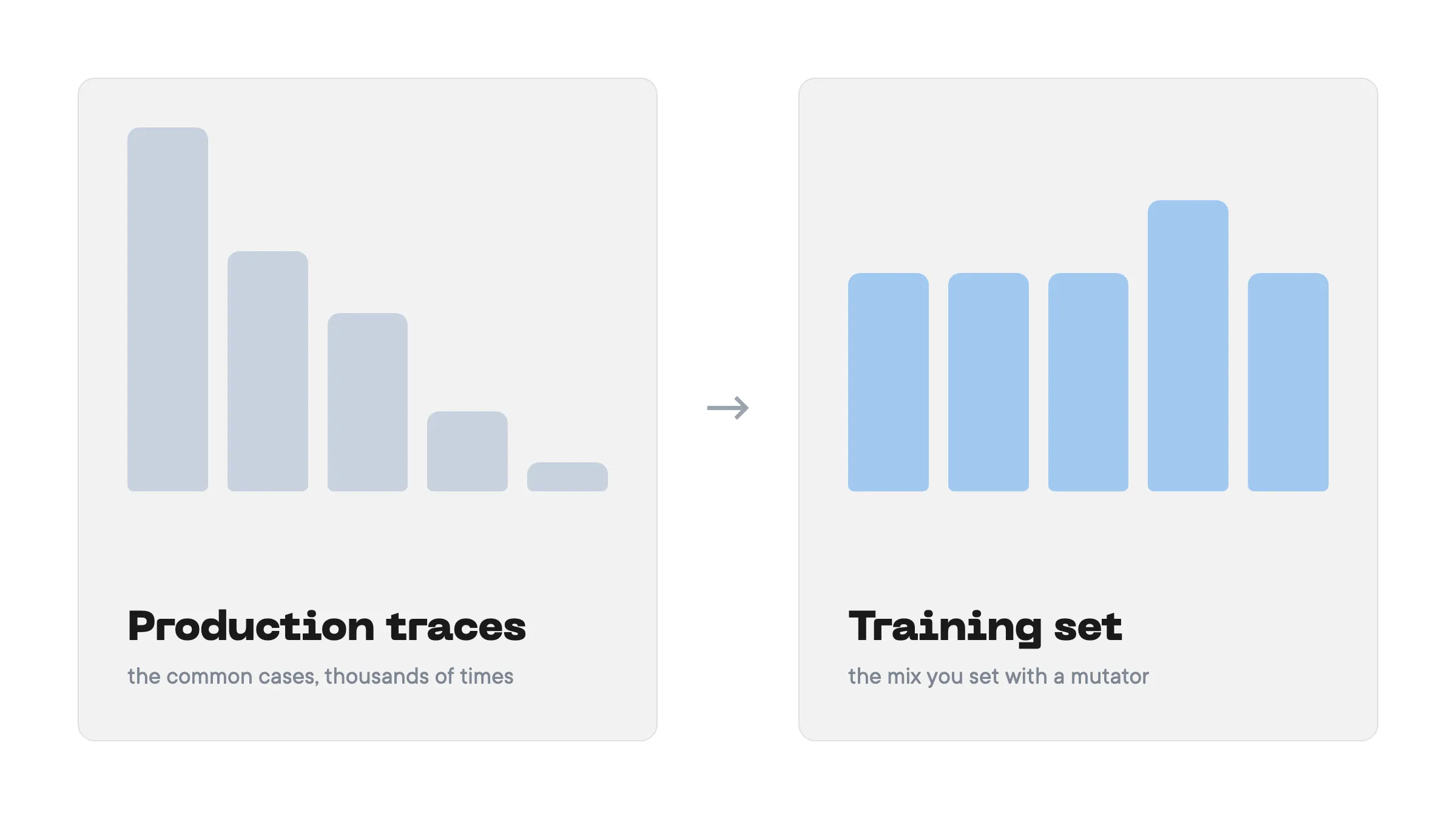
Most of your production traces are regular traffic: the request your agent handles a thousand times a day, the password reset, the “can I speak to a human”. But sometimes, there are situations that go off script - the customer interrupts the agent and wants something completely different, starts speaking in a different language, or has a specific problem that appears only once a year. They are rare in the traces because they are rare in production. But that does not mean they are unimportant - quite the opposite.
A training set generated from those traces has no reason to cover them either. It can inherit the skew of the traces, or drift to whatever the task description and the teacher’s own habits favour; the case study below shows a run where it did the second. Either way, you do not decide which situations the student practises. It sees some cases thousands of times and others only a handful of times, or not at all, and it can struggle with the cases it rarely practised when they show up in production.
Prompt mutators let you steer this mix. They are additional instructions to the teacher describing what the generated data should look like. You specify the situations your data should cover, the happy path, the edge cases, the rare request that costs money when it goes wrong, and how often each should appear, and we generate the data based on that. This gives the student more examples of the situations you need it to handle.
What is distil labs
distil labs fine-tunes task-specific small language models automatically. You bring the production traces your agent already produces, or a few dozen hand-written examples, and a teacher LLM generates a synthetic training set from them. Rule-based validators filter it, a small student model is fine-tuned on seed plus surviving synthetic data, and the result deploys behind an OpenAI-compatible endpoint. The student can beat its teacher on the narrow task because validation strips the teacher’s mistakes and the student spends all of its capacity on one job. What the teacher generates is decided by three inputs: the task description, the generation instructions, and the mutators. The first two are constant across every call. The mutators are the sampled one, and they are what this post is about.
Case study: a support assistant with two rare intents
We tested mutators on an artificial support dataset built to expose coverage gaps. It combines free-form replies with tool calls for Brightpath, a fictional team task-management SaaS. These are constructed examples, not customer production traces.
The assistant can act on the account through four tools: send a password reset, look up a subscription, open a billing case, and hand the chat to a human. Billing disputes require a specific sequence: look up the subscription, identify the invoice, and open a billing case with the right amount and case type. Handing the chat to a human does not satisfy that policy.
The seed set contains 50 conversations: 21 sign-in problems, 14 requests for a human, 11 pricing questions, two billing disputes and two rude customers. The test set deliberately gives more room to the rare cases, with 20 billing disputes among its 55 conversations. It measures performance on that constructed mix rather than the frequency of requests in production.
The seed set, test set, task description and mutator configurations are public in distil-labs/distil-mutators-support-dataset. You can inspect the inputs and use them for your own comparison. The checked-in configs currently default to a Qwen3.5-2B student and a GPT-OSS-120B judge; the scores below were reported for Qwen3.5-4B and Kimi K2.6, so those defaults do not reproduce the reported benchmark unchanged.
How the generated mix changed
We compared three generation runs with a target of 2,000 examples each: no mutators, a fixed mutator, and an adaptive mutator. Without mutators, billing disputes made up 82% of the generated examples despite accounting for only 4% of the seed data. Requests for a human and rude customers were both absent from the reported distribution. The task description and the teacher’s preferences can influence what it generates; the seed proportions alone did not determine the mix.
For the two mutator runs, we set the same target: 25% sign-in problems, 15% requests for a human, 20% pricing questions, 35% billing disputes and 5% rude customers. The adaptive run checked the generated mix every two batches instead of the default five.
| Intent | Seed | Mutator target | No mutators | Fixed | Adaptive |
|---|---|---|---|---|---|
| Password reset or login problem | 42% | 25% | 5% | 34% | 25% |
| Wants to speak to a human | 28% | 15% | 0% | 8% | 13% |
| Plan and pricing question | 22% | 20% | 13% | 26% | 20% |
| Billing dispute | 4% | 35% | 82% | 30% | 34% |
| Rude customer | 4% | 5% | 0% | 1% | 3% |
Shares are reported as measured and have not been renormalized; the reported fixed and adaptive columns sum to 99% and 95%. The experiment report does not account for the remaining shares.
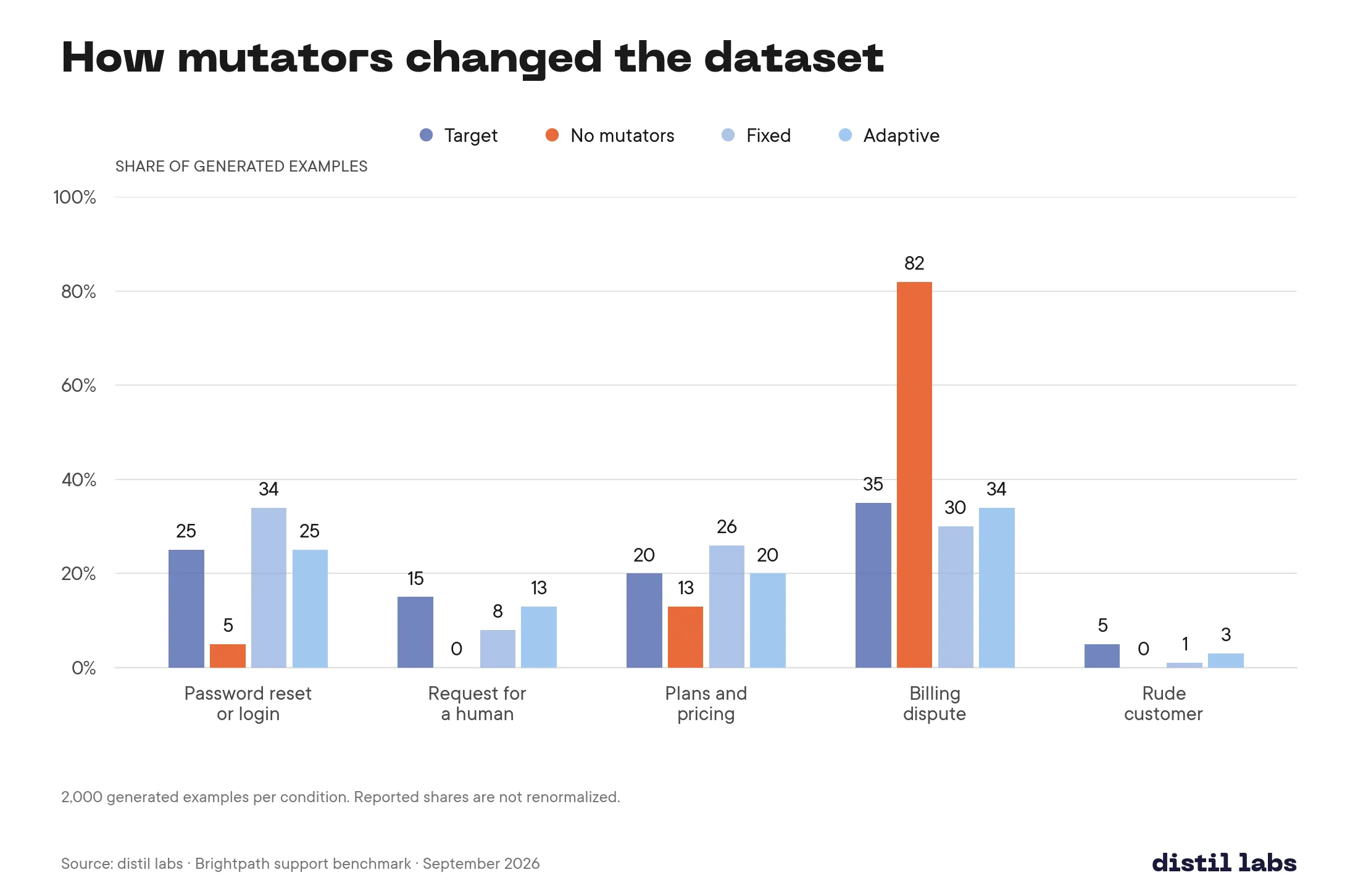
The fixed mutator reduced the billing-dispute share to 30%, but requests for a human and rude customers still fell short at 8% and 1%. With the adaptive mutator, each listed intent was within two percentage points of its target. This shows why counting what survives generation and validation matters: the requested mix and the final mix can differ.
What changed for the student
For each condition, we fine-tuned Qwen3.5-4B for four epochs with LoRA. We evaluated the resulting students, the untuned model, the GLM-5.3 low-thinking teacher and three other models on the 55-conversation test set. Because both replies and tool-call arguments contain free-form text, evaluation used Kimi K2.6 as an LLM judge.
The adaptive-mutator student scored 0.712 versus 0.672 without mutators, a difference of 0.040 on the judge-score scale. The fixed-mutator student scored 0.675. No confidence intervals, standard deviations or repeat-run counts were reported, so the adaptive result is a directional result on this small test set, not evidence of a statistically established gain. The teacher remained ahead at 0.882, a gap of 0.170 from the adaptive student.
| Model | Judge score (Kimi K2.6), higher is better |
|---|---|
| GLM-5.3 low thinking (teacher) | 0.882 |
| Qwen3.5-4B, tuned, adaptive mutator | 0.712 |
| Qwen3.5-4B, tuned, fixed mutator | 0.675 |
| Qwen3.5-4B, tuned, no mutators | 0.672 |
| gemma-4-31b-it | 0.661 |
| gemini-3.1-flash-lite | 0.646 |
| gpt-oss-120b | 0.646 |
| Qwen3.5-4B, base | 0.585 |
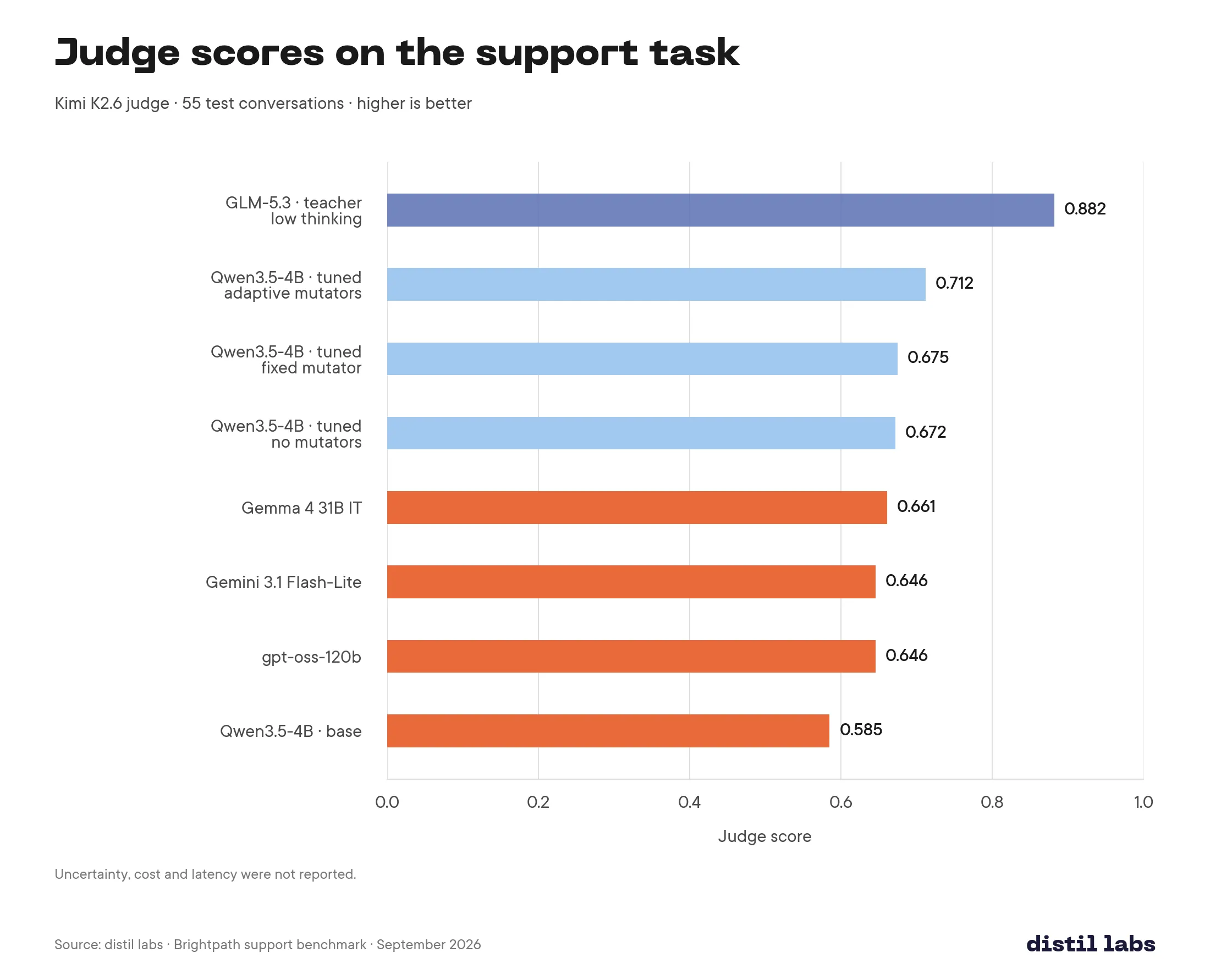
In this evaluation, the tuned 4B student with adaptive mutators scored above Gemma 4 31B and Gemini 3.1 Flash-Lite. The smaller parameter count gives context, but inference cost and latency were not reported for this experiment, so these scores do not establish a serving-cost or speed advantage. Most remaining student errors were on free-form replies; adding seed examples for those turns is a follow-up to test.
Quickstart
Add one mutator to config.yaml, under synthgen. You name the property to vary, list the values you want covered, and tell the teacher how often to ask for each. This example uses the case study’s target proportions with simplified wording; the public configs contain the full intent definitions:
synthgen:
  mutators:
    - name: topic
      description: what the customer wants from the support assistant
      target_distribution: [0.25, 0.15, 0.20, 0.35, 0.05]
      values:
        - "about a password reset or a login problem"
        - "from a customer who wants to speak to a human"
        - "about plans and pricing"
        - "about a billing dispute: refunds, double charges, invoice errors"
        - "from a rude customer: insults, threats to leave, sarcasm"
Every generation call samples one value and appends it to the generation prompt. What the teacher sees on a call that drew the fourth value:
Important! Make sure to follow those guidelines:
Generated examples should be about a billing dispute: refunds, double charges, invoice errors
The target distribution is a list of probabilities, one per value. We gave billing disputes 35%, since it is the case the student most needs to get right and the one the test set measures, kept the three common intents at 60% between them, and left rude customers at 5%. That is more than their share of the seed data, but this is a task where you want the student to see a rude customer often enough to have a pattern, not often enough to expect one.
Then run a smoke generation and count the topics in the output. For example, a trial that generates 64 examples at four examples per call has only 16 mutator draws. A small sample will not match the target exactly, particularly for a value with a 5% target. Once they look right, run the full generation and train.
Setting the proportions
The quickstart used explicit probabilities. There are three ways to set the target distribution of mutator values, and choosing one depends on whether your seed data already has the mix you want.
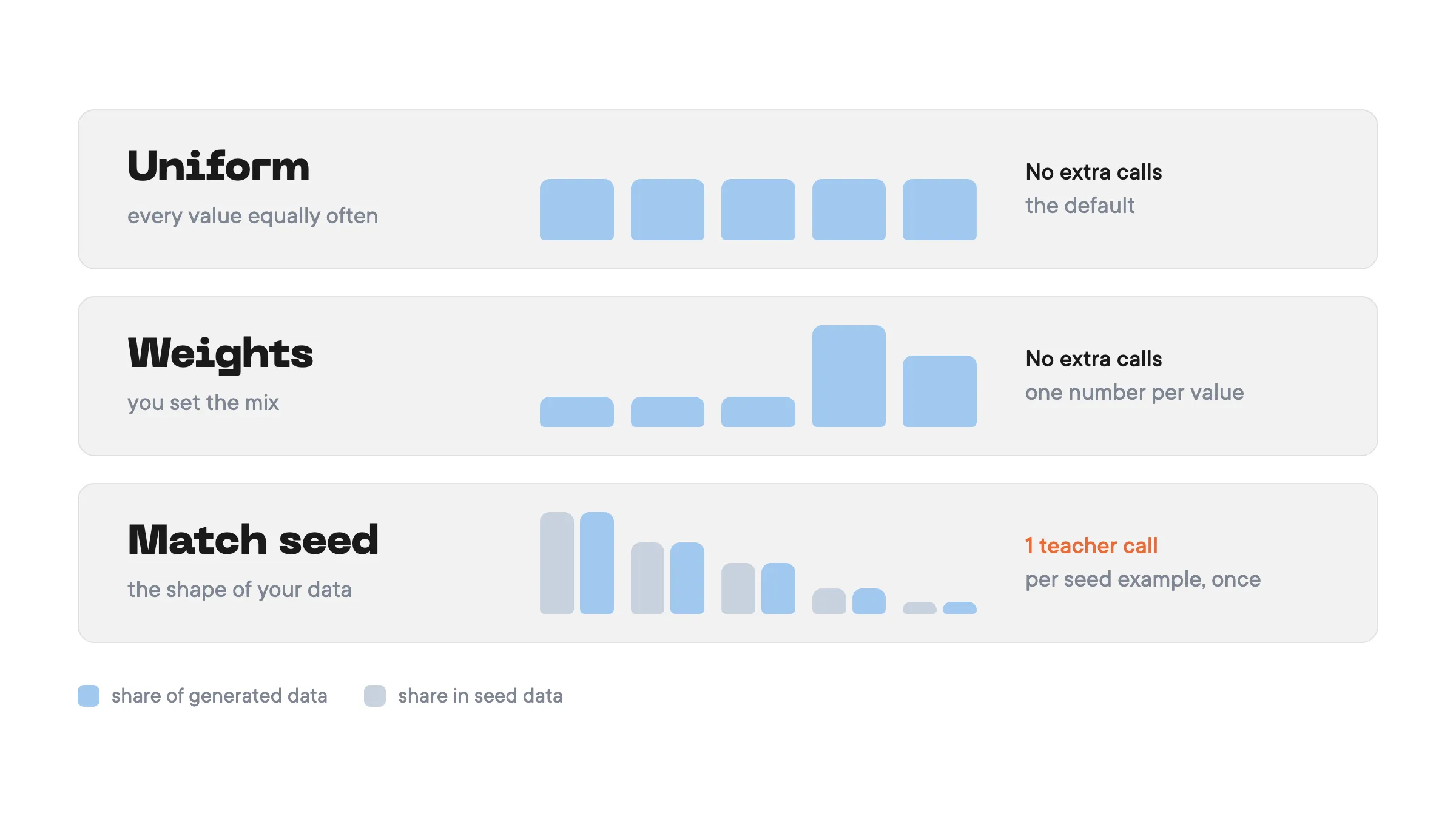
Uniform is the default. Each value has the same sampling probability. If your seed data is skewed and you simply want the student to see every case equally often, add the mutator and stop.
Explicit weights override the mix. One weight per value, normalised for you, so proportions and relative counts both work:
    - name: language
      values: [English, French]
      target_distribution: [3, 1]
This asks for English in roughly three calls out of four. Choose this if you know what your topic distribution should be, as we did above. You can also specify probabilities instead: [0.75, 0.25].
match_seed infers the distribution from seed data. At the start of the run, the teacher classifies each seed example along the mutator dimension and uses the proportions it finds as the target:
    - name: topic
      description: which part of the product the customer is asking about
      target_distribution: match_seed
      values:
        - "about billing disputes: refunds, double charges, invoice errors"
        - "about account cancellation: downgrades and win-back attempts"
        - "about technical support: setup problems and integration errors"
Use it when the seed data is already the distribution you want and you need the synthetic data to hold that shape rather than drift towards whatever the teacher finds easiest to write, which, as the case study shows, can happen. It costs one teacher call per seed example, so 200 seed examples is 200 calls before generation starts. Two caveats - a value that never appears in the seed data gets zero weight and is never asked for; if you want something the seed lacks, that is a job for explicit weights. And if no seed example lands on any of your values, the mutator falls back to uniform, with a warning.
The description field helps the classifier decide the topic of each seed example.
When the data is hard to generate: adaptive mutators
A fixed mutator asks for each value in the target proportions and never checks what came back. That can be enough when the teacher follows the instruction consistently. But for some, the teacher struggles to follow the instruction, or validation rejects its attempts more often, and the dataset ends up short on exactly the values you added the mutator for. In the case study that was requests for a human and rude customers: asked for at 15% and 5%, delivered at 8% and 1%.
For that case there is method: adaptive. Every few batches (synthgen.mutator_update_frequency, default 5; we used 2), the teacher labels each example that survived validation with the value it actually landed on. The running counts are compared against the target for the whole run, sampling shifts towards the values furthest behind, and once every value has reached its share it returns to the target distribution. Batches in between are not labelled; their counts are extrapolated from the last labelled one. Each label is a teacher call, so the default labels one batch in five, and increasing the number of batches between checks is cheaper and coarser.
synthgen:
  mutator_update_frequency: 2
  mutators:
    - name: topic
      method: adaptive
      description: what the customer wants from the support assistant
      target_distribution: [0.25, 0.15, 0.20, 0.35, 0.05]
      values:
        - "about a password reset or a login problem"
        - "from a customer who wants to speak to a human"
        - "about plans and pricing"
        - "about a billing dispute: refunds, double charges, invoice errors"
        - "from a rude customer: insults, threats to leave, sarcasm"
Reach for it when a smoke run with a fixed mutator shows some values falling short of the target, and read the counts before you do. The classifier sees validated examples only, so a value that validation rejects looks under-generated and gets asked for more. If it is being rejected because it is genuinely hard to produce correctly, adapting burns teacher calls on it; the fix is the value’s wording, or the validator. Write the description for any adaptive mutator, for the same reason it matters with match_seed.
Try it on your own traces
You already know which situations your model has to handle and which ones your traces barely cover. Write them down as a list of values, add a topic mutator to your config, and generate a training set that has them in the proportions you want. Start with a small generation run, inspect the output, and compare its intent counts with your target before training.
The field reference, match_seed, the adaptive method and the recipes for complexity, length and specificity are in the synthetic data docs. If your dataset does not come out the way you expected, tell us in Slack and we will look at the counts with you.
distil labs trains task-specific small language models that are cheaper and faster per request than general-purpose LLMs, with equal-or-better accuracy on bounded tasks. Docs · GitHub · Slack