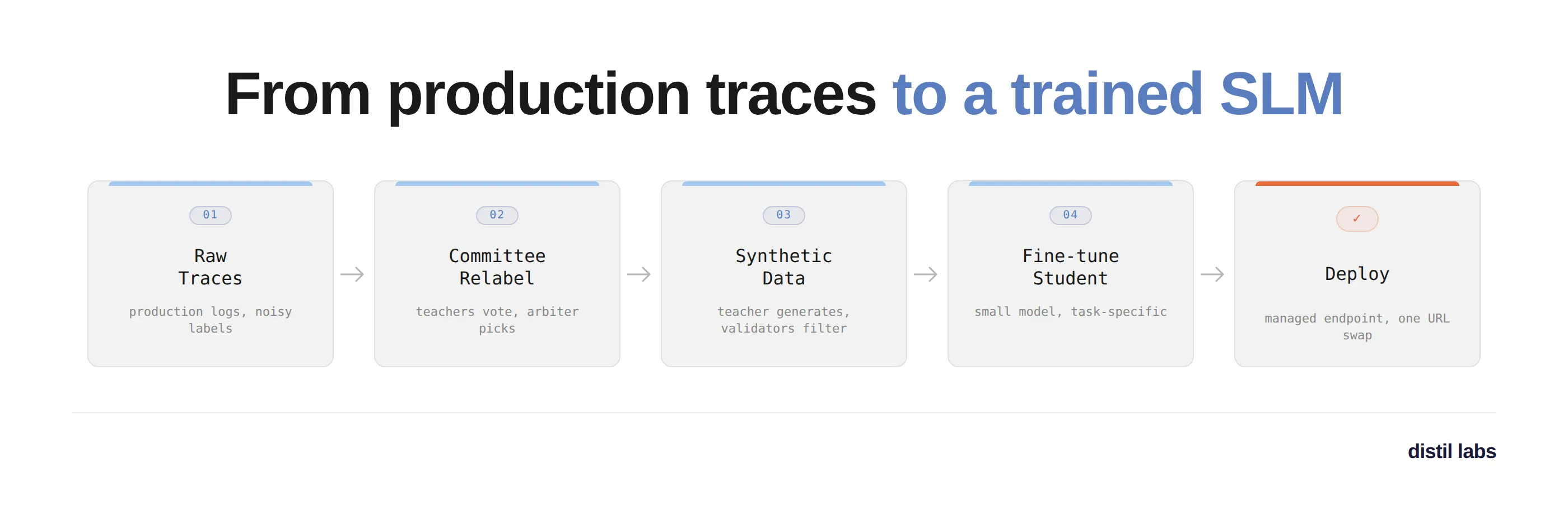
You have an LLM-powered app in production and it works, but every request pays a frontier-API bill and waits a second or two for the round trip. At scale those costs are driving up your margins enough that some features aren’t worth shipping. You know a small specialized model would handle this task at a fraction of the cost and latency, and you already have the data to train one: months of production logs. So you wire together a fine-tuning script, fight through a few rounds of CUDA error: device-side assert triggered, and eventually get a model that trains and runs - only to discover that the outputs are truncated mid-word and half the tool calls are missing their required arguments. What gives?
This is what usually happens when you train directly on production logs. The logs contain noisy labels, malformed outputs, and class imbalances - they look like training data but they aren’t, and iterating on cleaning them (re-train, discover a new failure mode, iterate again) eats weeks you don’t have.
What if you could just hand the raw traces to Claude, answer a few questions about what the model should do, and come back to a working deployed model? That’s what the distil labs Claude skill delivers, and we’ll walk through exactly that in this post. We’ll turn a few hundred noisy traces from a restaurant-assistant agent (scenario 2 from our traces vs. synthetic benchmark) into a fine-tuned Qwen3-1.7B running on a managed endpoint. All artifacts are in distil-labs/distil-tft-benchmarking.
What is distil labs?
distil labs is a platform that generates task-specific synthetic datasets and uses them to fine-tune small language models into specialized experts. You bring the task and some domain data (seed examples, or raw production traces); the platform produces a fine-tuned SLM that matches or exceeds the teacher model on that task, 50-400x smaller, ready to deploy on a managed endpoint. Check out our docs for a deeper dive.
Getting Started
distil labs gives you two ways to train models: the distil CLI for full control, or a Claude Code skill for a conversational workflow. The CLI is scriptable and automatable; the skill lets you describe what you need and handles the rest. We’ll use the skill for this tutorial.
Install the Distil CLI
curl -fsSL https://cli-assets.distillabs.ai/install.sh | sh
distil login  # or distil signup if you're new
Install the Claude Skill
Follow the instructions at distil-cli-skill. For Claude Code:
/plugin marketplace add https://github.com/distil-labs/distil-cli-skill
/plugin install distil-cli@distil-cli-skill
With that done, let’s train a model.
Walking through the workflow with Claude
I started by asking Claude what we were about to do:
> Hey Claude, we will be training an SLM for multi turn function calling
> based on the production logs in scenario-2-noisy-labels/tft-raw-data/.
> Can you explain the process on a high level?

⏺ 1. Prep. Inspect the traces, then write a converted traces.jsonl
     (OpenAI message format), a job_description.json, and a config.yaml.

  2. Upload & clean. The platform filters low-quality traces and uses
     a committee of teachers to relabel noisy outputs.

  3. Teacher eval. Verify the teacher can actually solve the task
     before spending hours on training.

  4. Train. Teacher generates synthetic data, student learns from it.

  5. Analyze & deploy. Compare the tuned student against the original
     production model, then deploy.
The skill knows its own workflow, which matters when you’re new to the platform because the traces-based workflow has steps you don’t find in a typical fine-tuning process.
Inspecting the raw traces
Before writing any code, Claude looked at the actual data and reported back:
> ok lets do pre-flight checks and then lets get going

⏺ Bash(distil whoami && distil update)
  ⎿  Logged in as jacek@distillabs.ai · CLI v0.15.0

⏺ Bash(wc -l traces.jsonl)
  ⎿  327 traces

⏺ Trace inspection findings

  Task: Virtual assistant for a restaurant search and reservation
  service. At each turn pick one tool call. Call FindRestaurants
  once city+cuisine are known, ReserveRestaurant after user confirms,
  else respond_to_user.

  Tools (3):
  - FindRestaurants(city, cuisine, price_range?)
  - ReserveRestaurant(city, date, party_size, restaurant_name, time)
  - respond_to_user(message)

  Noise confirmed (this is scenario 2). Trace 1 alone shows:
  - Greeting answered with "Have an enjoyable rest of the day!"
  - "Breakfast in Fairfield" answered with "They do not serve alcohol"
  - One assistant message talks about "checking into 1 room at 45 Park
    Lane in London" (wrong domain entirely)
  - FindRestaurants called with Pleasanton/Italian when user asked for
    Fairfield/Breakfast

  So the raw labels are clearly unreliable - committee relabeling will
  do heavy lifting.
These are exactly the kinds of bad labels that kill naive fine-tuning on raw logs. Claude then wrote a conversion script that reshapes the raw traces into the OpenAI messages format the platform expects:
⏺ Write(distil-workspace/convert_traces.py)
⏺ Bash(python convert_traces.py --input ../tft-raw-data/traces.jsonl \
      --output traces.jsonl)
  ⎿  converted 327 traces -> 327 lines written to traces.jsonl
Writing the prompt and config
With the traces reshaped, Claude wrote the two files that define the training run: job_description.json (task description, tool schemas, LLM-as-a-Judge rubric) and a minimal first-pass config.yaml:
base:
  task: multi-turn-tool-calling-closed-book
  student_model_name: Qwen3-1.7B
  teacher_model_name: zai.glm-5

trace_processing:
  observation_format: openai_messages

synthgen:
  validation_max_total_length: 15000
Before uploading, I asked Claude to sanity-check it, which turned out to be worth doing:
> Hey can you help me understand the config file, I want to see if we
> have the right setup for this task

⏺ 🔴 Missing: convert_to_single_turn: false

  The doc says: "Task-specific default: keep true for single-turn tasks.
  Set to false when training a multi-turn task - otherwise you'd split
  the conversations you need to preserve as seed data into isolated
  single-turn examples."

  The default is true, so without setting this, we'd destroy the
  multi-turn structure we care about.

  🟡 Missing: trace_processing.teacher_model_name

  There are actually two teacher slots:
  - base.teacher_model_name: generates synthetic training data (GLM-5 ✓)
  - trace_processing.teacher_model_name: picks the best relabel from
    the committee (defaulting to openai.gpt-oss-120b)

  I'll set the trace-processing one to GLM-5 too.
Claude re-read the configuration reference when prompted and caught two real bugs: a multi-turn setting that would have silently flattened our conversations, and an unset teacher for the relabeling committee.
Upload and trace processing
With the files ready, Claude ran the upload. Behind the scenes the platform runs three passes: relevance filtering to drop off-task traces, committee relabeling where four teacher models generate candidate outputs and an arbiter picks the best one, and a train/test split. The relabeling step is the one that turns noisy production logs into training data you can trust.
⏺ Bash(distil model upload-traces fc615b15-... --data distil-workspace/)
  ⎿  Upload successful. Upload ID: e9dd2421-1c6d-4dd4-96ad-344f3adf0fcf

[Claude polls in the background for ~10 minutes]

⏺ 09:53:05 status=JOB_SUCCESS
Approving the test set
Trace processing produced our test set. Before moving on, the skill stops for an approval: it scores the original production model against the generated test set (so we know what our baseline actually is) and surfaces the result for a human check.
⏺ Original Model Analysis - TL;DR
  - LLM-as-a-Judge: 0.948 · tool_call_equivalence: 0.922
  - Function-name match: 75/77
  - Verdict: HIGH agreement

Reply "approved" to proceed to teacher evaluation, or tell me what to
change (reprocess with different trace_processing parameters, drop
specific examples, swap in a curated test.jsonl).

> approved
Full report: original-model-analysis.md. One caveat worth flagging: the test set here only contains traces that survived relevance filtering, so the obviously bad ones were removed. Think of 0.948 as “how consistent the clean examples in the original data are,” not a general quality score for the production model. The approval gate exists precisely because the test set drives everything downstream - if relabeling introduced noise or dropped cases you care about, this is the moment to catch it.
Teacher evaluation with a verdict
Next, we validate that the teacher can solve this task before spending hours on training:
⏺ Bash(distil model run-teacher-evaluation fc615b15-...)

⏺ Teacher Evaluation - TL;DR
  - LLM-as-a-Judge (primary): 0.808
  - staged_tool_call: 0.705 · Function match: 69/75
  - Verdict: PROCEED (0.808 ≥ 0.70 tool-calling threshold)
Full report: teacher-eval-analysis-iter-1.md. The verdict is PROCEED so we move straight to training. Had the score come in lower, Claude would have flagged the task as likely under-specified and walked us through iterating on the job description before burning training time.
Confirming before training
Training takes about six hours and burns credits, so the skill stops for an explicit confirmation:
⏺ Step 8 training confirmation checkpoint. Here's what will run:

  base.task: multi-turn-tool-calling-closed-book
  base.student_model_name: Qwen3-1.7B
  base.teacher_model_name: zai.glm-5
  trace_processing.convert_to_single_turn: false
  trace_processing.teacher_model_name: zai.glm-5
  synthgen.mutation_topics: [5 conversation-length patterns]

  - Duration: ~6 hours
  - Cost: burns credits, not easily refunded once started
  - Pipeline: teacher eval → synthetic data gen → student finetune

  Reply "go" to kick off, or tell me what to change first.

> lets go!
Training and analysis
⏺ Bash(distil model run-training fc615b15-...)
  ⎿  Kicked off SLM training ID 26c54615-...
Training runs server-side in three stages: teacher evaluation, synthetic data generation (the teacher produces ~10,000 synthetic examples grounded in the relabeled traces), then student fine-tuning. When it finished, Claude pulled predictions for the tuned student, the base (untuned) student, the teacher, and the original production model, and produced a four-way comparison. Full report: training-analysis-iter-1.md. Verdict: DEPLOY.
Results
Here’s what we built: a fine-tuned Qwen3-1.7B multi-turn tool-calling model, distilled from 327 noisy production traces.
| Model | LLM-as-a-Judge (↑) | staged_tool_call (↑) | Function match |
|---|---|---|---|
| Base student (Qwen3-1.7B, untuned) | 0.513 | 0.535 | 45/78 |
| Teacher (zai.glm-5, 744B) | 0.808 | 0.695 | 69/78 |
| Tuned student (Qwen3-1.7B) | 0.846 | 0.769 | 76/78 |
| Original production model | 0.948¹ | 0.968 | 75/77 |
¹ The test slice for this row only contains traces where the original model’s output survived relevance filtering, so it’s effectively being scored on its own best-case inputs. Not apples-to-apples with the other three rows.
The tuned 1.7B student beats its own 744B teacher on LLM-as-a-Judge by nearly 4 percentage points, and adds 33 percentage points over the untuned base model. The student isn’t just mimicking the teacher - it’s learning the decision-point behavior that the committee relabeling enforced on the training data. On the ten examples where the teacher hedged at confirmation turns (“I’ll make the reservation now and check…”), the tuned student commits to ReserveRestaurant correctly. This is a pattern we see across the distil labs benchmarks: with filtered synthetic data and task specialization, a well-tuned small student routinely beats a general-purpose teacher on its one target task.
Deploying the model
Once you have a DEPLOY verdict, deploying on a managed distil labs endpoint is one command:
distil model deploy remote <model-id>You get back a URL and API key. From your application code, this is a one-line swap - the endpoint is OpenAI-compatible, so any SDK that talks to OpenAI works unchanged:
from openai import OpenAI

# Was: OpenAI(api_key="sk-...")
client = OpenAI(
    base_url="https://your.deployment.url/<training-id>/v1",
    api_key="your-distil-api-key",
)

response = client.chat.completions.create(
    model="model",
    messages=[{"role": "user", "content": "..."}],
)
The Claude skill can drive all of this the same way it drove training: ask it to deploy the model and query it with a test message, and it will run the CLI commands, surface the endpoint URL, and help you wire it into your application.
If you’d rather self-host, distil model download gives you the weights and a Modelfile, and distil model deploy local runs a local OpenAI-compatible server via llama-cpp. Full options (vLLM for high throughput, quantization formats, on-prem setups) are in the deployment docs.
Get Started
# Install the CLI
curl -fsSL https://cli-assets.distillabs.ai/install.sh | sh
distil signup

# Add the Claude skill
/plugin marketplace add https://github.com/distil-labs/distil-cli-skill
/plugin install distil-cli@distil-cli-skill
Then point Claude at your traces and let it drive.
Resources
- distil labs Documentation
- Claude Skill on GitHub
- Example repo for this walkthrough
- Traces vs. synthetic benchmark post
- CLI Reference
- Join our Slack
We took 327 noisy production traces and turned them into a fine-tuned, deployable small model in a single conversation. No labeling pipeline, no PyTorch - just Claude, a workflow that knows what it’s doing, and a managed endpoint at the other end.