If your team runs an LLM-powered agent in production, every request it handles is a test case you never had to write. That trace data describes your problem space better than any hand-crafted dataset: the vocabulary your users actually use, the edge cases that show up in the real traffic, the real distribution of requests.
This post shows how to turn that signal into a deployed specialist model, using dlt to extract and normalize traces from wherever they live and distil labs to train a compact expert model that outperforms the general-purpose LLM you’re running today.
You can read through the details and implementation in our joint repository.
The two problems that block most fine-tuning projects
The first problem is access. Production traces are scattered across databases, log aggregators, and cloud storage buckets in incompatible formats, mixed together with traffic from multiple agents. Getting them into a single clean, structured dataset requires real extraction and normalization work.
The second problem is that even once you have the traces, you are still far from having training data. Raw traces are noisy: they contain imbalanced class distributions, malformed outputs from bad inference runs, and responses that were technically logged but factually wrong. They are not clean (input, output) pairs you can hand to a fine-tuning job. To build a model from them, you still need to curate seed examples, generate synthetic training data at scale, fine-tune a model, evaluate it against a baseline, and package it for deployment.
dlt solves the first problem. It connects to any data source (Postgres, S3, BigQuery, REST APIs, log aggregators) and delivers clean, structured traces to Hugging Face in a consistent format regardless of where they originated. distil labs solves the second. It takes those traces as domain context, uses them to steer a large teacher model’s synthetic data generation, and produces a fine-tuned specialist ready for deployment. Together they form an end-to-end pipeline with a clean handoff between the two steps.
How the pipeline works
Three tools, each doing one job.
dlt connects to your production data store (any database, cloud storage bucket, API, or log aggregator) and writes cleaned, structured traces to Hugging Face as a versioned Parquet dataset. You write a standard dlt pipeline. The destination is Hugging Face. Everything downstream is unchanged regardless of where your data lives.
Hugging Face acts as the shared hub between tools. The cleaned trace dataset lands there after the dlt step, versioned and immediately accessible. The trained model is published back there after training. Both are available to the rest of your stack.
distil labs reads the trace dataset from Hugging Face and uses it as domain context. The key thing to understand about this step: we are not training on your traces directly. We feed them to a large teacher model as context, so the synthetic training data it generates reflects your vocabulary, your function schemas, and your users’ phrasing patterns, not just the model’s generic priors. The student is then fine-tuned on that synthetic dataset and published back to Hugging Face.
Production traces                 Hugging Face                    Hugging Face
(any source)                      (data hub)                      (model hub)
     |                                |                                |
     v                                v                                v
+---------+   cleaned traces    +-------------+  traces + seed   +-------------+
|   dlt   | ------------------> |  HF Dataset | ---------------> | distil labs |
+---------+  dlt HF destination +-------------+                  +------+------+
                                                                        |
                                                         synthetic data | generation
                                                         + fine-tuning  |
                                                                        v
                                                               +-------------+
                                                               |  HF Model   |
                                                               +-------------+
dlt: your traces, wherever they live
dlt can load data from any source (Postgres, Snowflake, S3, BigQuery, local files, REST APIs). You write the pipeline once. The source connector is the only thing that changes between projects; the transformation logic and the Hugging Face destination remain the same.
distil labs: from traces to a deployed specialist
Once the traces are on Hugging Face, distil labs takes over. The platform reads the dataset, runs a lightweight preprocessing step to select a small seed set of clean representative examples (this currently runs as a short script ahead of training and will be integrated directly into the platform shortly), and then feeds the remaining traces as unstructured domain context to a large teacher model.
The teacher generates ~10,000 synthetic training examples grounded in your real traffic. Each generated example is validated and filtered before entering the training set. The student model is fine-tuned on the curated synthetic dataset, not on your raw traces. The result is a specialist that knows your domain, published straight back to Hugging Face.
distil model create my-iot-model
distil model upload-data <model-id> --data ./finetuning-data
distil model run-teacher-evaluation <model-id>
distil model run-training <model-id>
Walkthrough: a smart home function-calling agent
To make this concrete, we trained a 0.6B specialist model that routes IoT smart home commands to the correct function call. We used the Amazon MASSIVE dataset as a stand-in for production traffic: 16,000+ natural language utterances across 60 intents. We use the IoT scenario (commands like “turn on the kitchen lights” or “make me a coffee at 7am”) covering 9 functions.
The full code and training artifacts are in the demo repository.
Stage 1: dlt extracts and uploads traces
stage1-preprocess-data.py runs a dlt pipeline that filters to the IoT scenario, formats each record as an OpenAI function-calling conversation trace, and uploads the result to Hugging Face as a versioned Parquet dataset. The result is 1,107 IoT conversation traces, versioned and accessible. See the README for full pipeline details.
Stage 2: automatic seed curation
stage2-prepare-distil-labs-data.py selects the seed set automatically using an LLM judge that scores each trace on inference clarity and utterance coherence, keeping only perfect-scoring examples. The remaining traces go into unstructured.jsonl as domain context for synthetic data generation, with sampled examples excluded to prevent data leakage. This produces the finetuning-data/ directory ready for upload. See the README for the full curation logic.
Stage 3: distil labs trains the specialist
The Distil CLI uploads the seed data and unstructured traces to the platform. The teacher model (GPT-OSS-120B) reads the traces as domain context and generates ~10,000 synthetic training examples, each validated and filtered before entering the training set. The student (Qwen3-0.6B) is then fine-tuned on the result. Training completes in under 12 hours. See the README for the CLI commands.
Stage 4: deploy from Hugging Face
Once training is complete, a single distil model deploy remote command provisions a vLLM-based endpoint. The trained model is also available directly at distillabs/massive-iot-traces1 on Hugging Face for self-hosted deployments. See the README for deployment options including local inference.
Results
We trained a Qwen3-0.6B student distilled from an openai.gpt-oss-120B teacher, using traces extracted by dlt, stored on Hugging Face, and used by distil labs as domain context for synthetic data generation.
| Model | Tool Call Equivalence (^) | Parameters |
|---|---|---|
| Teacher (openai.gpt-oss-120B) | 50.0% | 120B |
| Base student (Qwen3-0.6B, no fine-tuning) | 10.26% | 0.6B |
| Tuned student (Qwen3-0.6B, distil labs) | 79.49% | 0.6B |
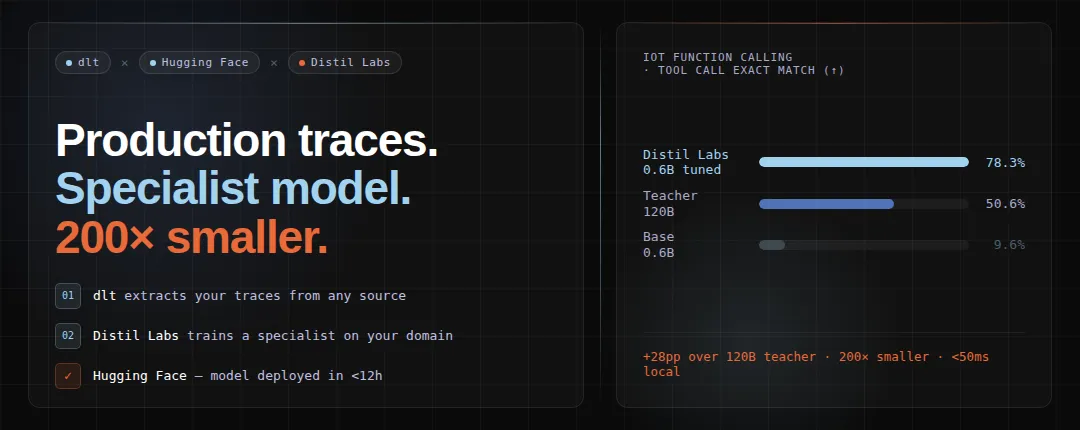
The tuned 0.6B model beats the 120B teacher by 29 points on exact structured match. The teacher scores lower because it is a general-purpose model: it has never seen your specific function schemas or the phrasing patterns of your users. The student, trained on synthetic data grounded in real traffic, is a specialist in exactly this task and nothing else.
The efficiency gains compound on top of that accuracy advantage:
- 200x smaller than the teacher model
- Under 50ms local inference vs. 400-700ms for a cloud API call
- Zero manual annotation (the LLM judge handled seed curation automatically)
The model achieves 78.3% exact match, which means roughly 1 in 5 queries may need a fallback or review step. For production deployments, consider adding a confidence threshold and routing low-confidence predictions to a larger model.
Conclusion
Your production LLM agent has been describing your problem space in detail every time it handles a request. dlt makes that data accessible from wherever it lives. distil labs turns it into a specialist model that outperforms the general-purpose system you’re already running, at a fraction of the cost and latency.
The full pipeline is open source. Clone the demo repository, swap in your own dlt source connector, and run the same stages against your own traces.
To get started:
# Install the distil labs CLI
curl -fsSL https://cli-assets.distillabs.ai/install.sh | sh
distil login
What’s next
This walkthrough used a separate script to curate seed examples from traces. That manual step is going away. distil labs is integrating a full trace-to-model pipeline directly into the platform: a panel of LLM judges scores, filters, and corrects raw production logs automatically, handling noisy labels, class imbalance, and distribution shift out of the box. The end state is simple: point us at your traces and kick back. We are currently benchmarking this pipeline across five scenarios including real customer data, and the next post will cover the results.
More trace sources, zero new code. dlt already supports REST API sources out of the box, which means you can point the same pipeline at LLM observability providers (Langfuse, Arize, Snowflake Cortex) or OpenTelemetry-compatible platforms like Dash0 and load traces without writing a custom extractor. We will publish ready-made dlt source configs for the most popular providers in a follow-up post.
Smarter preprocessing with dlt transformations. dltHub is shipping more powerful transformation primitives that will let you filter, deduplicate, and reshape traces inside the pipeline itself, before anything touches Hugging Face. That means cleaner input data with less glue code.
Links
- Demo repository: full pipeline code and training artifacts
- Trained model on Hugging Face
- dlt source connectors: connect to your production data store
- distil labs documentation
- distillabs.ai: sign up and start training